A new audio-only recording option for Teams meeting suppresses the video feed from meeting participants when generating the MP4 file for the meeting recording. The idea is to better preserve user privacy during recording playbacks. Few will miss the video stream because the audio is usually more important. The audio is also the basis for the meeting transcript, and that leads to AI-generated outputs like meetings summaries and action items.
The Teams meeting co-organizer role helps to run smooth meetings, but co-organizers can’t do everything an organizer can. How to get around the limitations? Well, one way is to use an old technique to schedule important meetings using a special account. There might be others, but that’s the one described here.
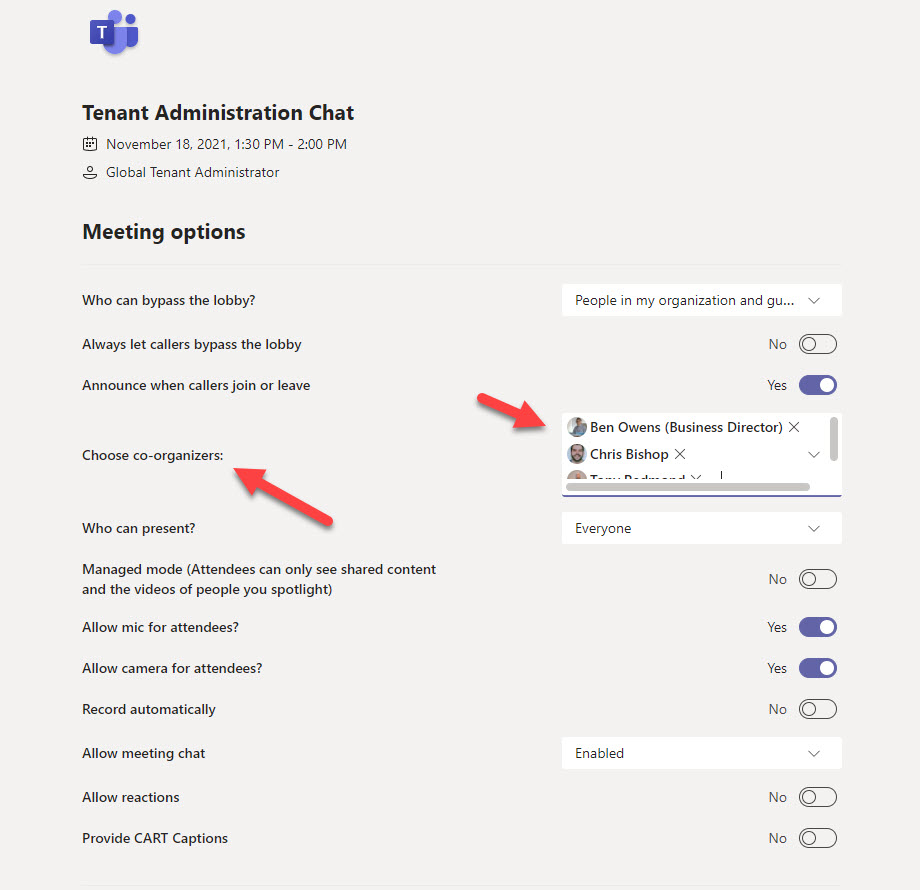
Microsoft Teams is introducing a new co-organizer role for meetings. The role allows people to share the workload involved in managing complex meetings, like webinars. The role is optional and likely to be used in a small minority of Teams meetings. Even so, it’s a useful feature to have available when you’re planning a large and complex meeting.